
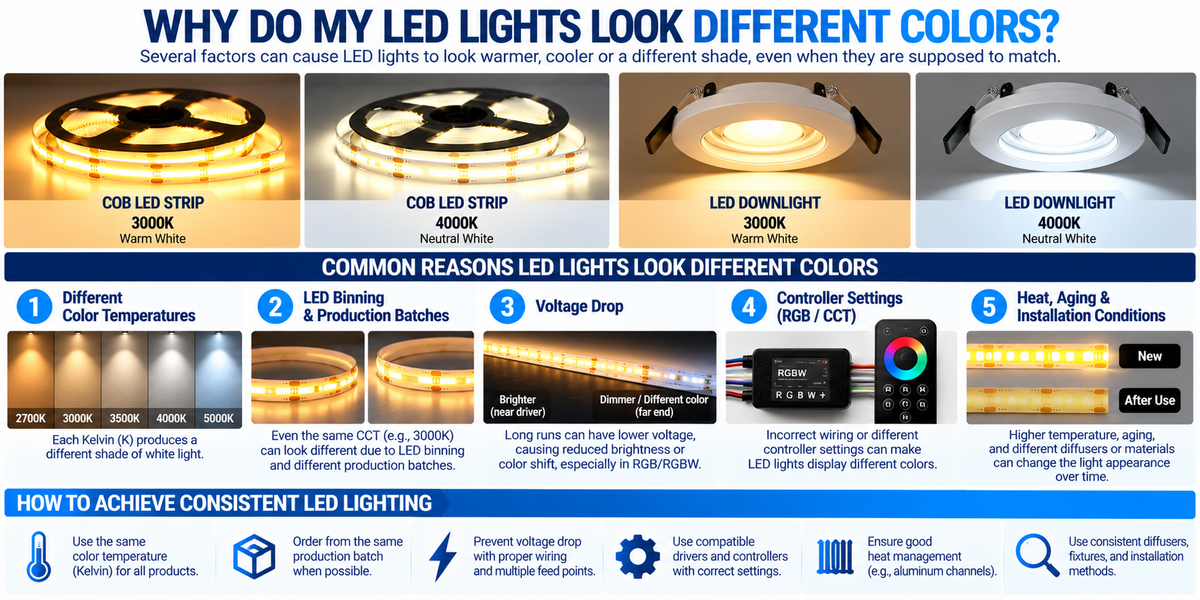
Why Do My LED Lights Look Different Colors? Causes and Solutions
You install a new LED lighting system, turn it on, and notice something unexpected.
One LED strip looks warm white, while another appears slightly cooler.
Two recessed downlights are both labeled 3000K, but one looks more yellow.
Or an RGB LED strip displays different colors at opposite ends of the installation.
Why do LED lights look different colors—even when they are supposed to match?
Color inconsistency is a common challenge in residential, commercial, and architectural lighting projects.
The problem may be caused by several factors, including:
- Different color temperatures
- LED manufacturing variations
- Different production batches
- Voltage drop
- Incorrect wiring
- Driver incompatibility
- RGB or RGBW controller settings
- Temperature differences
- Aging
- Diffusers and surrounding materials
Understanding the cause is the first step toward solving the problem.
In this guide, we explain how to identify LED color differences, correct common installation problems, and maintain consistent lighting across large projects.
1. Different Color Temperatures
One of the most common reasons LED lights look different is that they have different correlated color temperatures, or CCTs.
Color temperature is measured in Kelvin (K).
Lower Kelvin values produce warmer-looking white light, while higher values produce cooler-looking white light.
| Color Temperature | Light Appearance | Common Applications |
|---|---|---|
| 2700K | Warm white | Bedrooms, living rooms |
| 3000K | Soft warm white | Kitchens, hospitality |
| 3500K | Warm-neutral white | Offices, mixed-use spaces |
| 4000K | Neutral white | Commercial interiors |
| 5000K | Daylight-like white | Workshops, task areas |
| 6500K | Cool daylight-like white | Specialized lighting |
For example, a 2700K COB LED strip installed beside a 4000K downlight will create a noticeable difference.
Both products may be functioning correctly.
They simply produce different appearances of white light.
How to Fix It
Check the Kelvin rating of every product before installation.
For a consistent lighting design, coordinate the CCT of:
- LED downlights
- COB LED strips
- Linear fixtures
- Under-cabinet lighting
- Cove lighting
- Decorative lighting
Contractor Tip: Do not assume that every product described as “warm white” has the same color temperature. Always check the actual Kelvin specification — it is listed on every COB strip product page. Our guide on what color temperature is best for LED downlights covers how to choose between them.
2. LED Binning: Why Two 3000K Lights May Look Different
Even when two LED products have the same stated color temperature, they may not appear identical.
This can happen because of a manufacturing process called LED binning.
During production, LED chips are tested and sorted according to characteristics such as:
- Color
- Brightness
- Electrical performance
LEDs are grouped into bins based on these measured characteristics.
Two products may both be marketed as 3000K but fall into different chromaticity bins.
One may look slightly pinkish, while another appears more yellow or green.
What Is SDCM?
SDCM stands for Standard Deviation of Color Matching.
It is commonly associated with MacAdam ellipses and describes the size of an allowed chromaticity variation around a target color.
In general:
- 1–2 SDCM: Very tight color consistency
- 3 SDCM: Good consistency for many architectural applications
- 5 SDCM: Greater potential for visible differences
- Higher values: More variation may be noticeable
The visibility of differences depends on the colors, lighting conditions, and observer.
How to Prevent Binning Problems
For professional projects, request products with suitable color-consistency specifications.
Where possible, use the same:
Manufacturer + Product Model + CCT + Production Batch
For highly visible architectural lighting, ask the supplier about SDCM or chromaticity tolerances. Contact our team if a project requires batch-matched material.
3. Different Production Batches
Another common issue occurs when LED products are purchased at different times.
Imagine installing 100 feet of COB LED strip during the first phase of a project.
Several months later, another 50 feet is purchased for an extension.
Even if the new product has the same model number and CCT, manufacturing variations may create a slight color difference.
This is particularly noticeable when the two strips are installed side by side.
How to Avoid This Problem
For large installations:
- Calculate the total required strip length.
- Include reasonable spare material.
- Purchase from the same production batch when practical.
- Test adjacent sections before permanent installation.
- Keep spare strips for future repairs.
Professional Recommendation: For continuous architectural lighting, color consistency should be considered during purchasing—not after installation. Contact our team for wholesale pricing on full-project quantities.
4. Voltage Drop Along LED Strips
Voltage drop is another important cause of color inconsistency, especially in long LED strip installations.
As electrical current travels through wiring and LED strip conductors, some voltage is lost due to resistance.
For example, a nominal 24V LED strip may receive a lower voltage near the far end of a long run.
This can affect:
- Brightness
- Color uniformity
- Channel balance in multi-color strips
Can Voltage Drop Change White LED Color?
For a single-color white LED strip, voltage drop typically causes reduced brightness.
It does not necessarily create a large change in color temperature.
However, some LED systems may show a visible color shift because of their electrical design.
The effect can be more noticeable in RGB, RGBW, and tunable-white systems.
Example
Consider a long RGB LED strip.
If the red, green, and blue channels respond differently to reduced voltage, the color at the far end may no longer match the beginning.
How to Fix Voltage Drop
- Follow the manufacturer's maximum run length.
- Use appropriately sized wiring.
- Reduce excessive cable lengths.
- Use additional feed points where permitted.
- Divide large installations into shorter runs — a multi-output transformer provides a separate channel for each.
- Consider 24V systems when appropriate.
A higher-capacity driver alone does not eliminate voltage drop along a long strip. Our guide on how many feet one driver can power explains the difference between driver capacity and run length.
5. Incorrect LED Driver Voltage
An LED driver must match the electrical requirements of the lighting product.
For example:
12V LED Strip → Compatible 12V Driver
24V LED Strip → Compatible 24V Driver
Using the wrong output voltage can cause unstable operation, incorrect light output, overheating, or permanent damage.
Never connect a 12V constant-voltage strip directly to a 24V power supply. Several of our dimmable drivers are switchable between 12V and 24V, so confirm the setting before connecting.
How to Check
Verify the driver's:
- Output voltage
- Rated wattage
- Output type
- Dimming method
- Environmental rating
Also confirm that the LED strip is designed for that type of supply.
6. Driver Quality and Output Stability
Even when the nominal voltage is correct, driver quality can affect LED performance.
A poor-quality or malfunctioning driver may produce unstable output.
Depending on the lighting system, this can contribute to:
- Flickering
- Brightness fluctuations
- Uneven performance
- Color instability
This is especially important in commercial installations with multiple drivers.
Contractor Tip
When several identical lighting zones look different, verify that the drivers are compatible and operating correctly before replacing the LED strips — an overloaded driver can also produce unstable output.
Use suitable test equipment and follow electrical safety procedures.
7. Incorrect RGB or RGBW Wiring
Color mismatches in RGB and RGBW systems are often caused by incorrect wiring.
An RGB system typically includes separate control channels for:
Red + Green + Blue
RGBW systems add a separate white channel.
If channel connections are incorrect, the displayed color may differ from the controller command.
For example:
You select red, but the strip displays green.
Or one zone displays blue while another displays red.
This often indicates a wiring or channel-mapping problem rather than defective LEDs.
How to Troubleshoot
- Turn off power before inspecting wiring.
- Confirm the controller's output configuration.
- Check the LED strip's channel markings.
- Verify connector pin assignments.
- Test each color channel individually.
- Confirm all zones use compatible controllers.
Do not assume that wire colors or connector pin order are standardized across different products.
8. Different RGB Controller Settings
Multiple RGB or RGBW lighting zones may look different because they are not using identical control settings.
For example:
Zone 1: RGB values set to a particular shade of blue.
Zone 2: A different brightness level or color mix.
Even small changes in channel intensity can produce a visible difference.
How to Fix It
Synchronize the controller settings across zones.
Check:
- Selected color
- Brightness
- Color mode
- Scene settings
- Channel configuration
- Controller compatibility
For large commercial projects, compatible multi-zone control systems can help maintain consistent operation — a 4-zone remote or WiFi controller can drive several zones from one source. Our guide on synchronizing multiple LED strip zones covers the setup in detail.
9. RGB White vs. Dedicated White LEDs
This is an important distinction.
Some RGB strips create an approximate white appearance by combining red, green, and blue light.
RGBW strips include a dedicated white LED channel.
These two methods may produce visibly different white light.
For example:
RGB-Mixed White ≠ Dedicated 3000K White
An RGB-generated white may have a different tint and spectral composition than a dedicated white LED.
Recommendation
For applications where white-light quality matters, consider dedicated white, CCT, or RGBW products appropriate to the project.
Do not expect RGB-mixed white to perfectly match a high-quality white COB strip.
10. CCT Controller Calibration and Channel Balance
Tunable-white LED strips typically combine warm-white and cool-white LED channels.
The controller adjusts their relative output to create intermediate color temperatures.
If different zones use different:
- Controllers
- Channel settings
- LED strip models
- Driver configurations
their white-light appearance may not match.
Example
Two CCT strips are both commanded to approximately 3500K.
However, one strip may use different warm-white and cool-white LED characteristics.
The result may be a visible color difference.
How to Fix It
Use compatible CCT strips and controllers.
Where possible, standardize the equipment and verify color matching during commissioning.
11. LED Aging and Color Shift
LEDs can change in appearance as they age.
Over time, the optical characteristics of LEDs may shift due to:
- Phosphor aging
- Encapsulation changes
- Heat exposure
- Operating conditions
- Material degradation
This means a new replacement LED strip may look different from an older strip, even if both were originally the same CCT. Our guide on LED lifespan covers how lumen maintenance and color shift relate.
Commercial Example
A retail store installs warm-white COB strips in 2023.
In 2026, one section is replaced.
The new strip may appear slightly different from the older sections because the original lighting has aged.
How to Reduce This Problem
- Use quality lighting products.
- Manage operating temperatures.
- Avoid excessive electrical loading.
- Maintain spare material when practical.
- Consider replacing adjacent sections when exact matching is essential.
12. Excessive Heat Can Affect LED Color
Temperature affects LED performance.
High operating temperatures can influence:
- Light output
- Electrical behavior
- Color stability
- Long-term aging
For example, a COB LED strip installed in a poorly ventilated enclosure may operate at a higher temperature than an identical strip mounted in a suitable aluminum channel.
Over time, the two installations may age differently.
How Aluminum Channels Help
Aluminum LED channels can help spread heat away from the LED strip.
They also provide:
- Mechanical protection
- Straight mounting
- Diffuser compatibility
- A professional finished appearance
For high-output or long-operating-hour installations, proper thermal management is particularly important — a larger profile such as the BN256 offers more aluminum mass than a shallow extrusion. See our guide on how aluminum channels help extend LED strip lifespan.
13. Different Diffusers Can Change Light Appearance
Sometimes the LED strips themselves are identical, but the diffusers are different.
For example:
Clear Diffuser
These materials can change the apparent brightness, distribution, and visual appearance of the light.
Some diffuser materials may also introduce a slight color tint.
Example
Two identical 3000K COB strips are installed in different aluminum channels.
One uses a clear cover, while the other uses a heavily diffusing opal cover.
The lighting may appear different because the optical systems are not identical.
Recommendation
For continuous or adjacent installations, use consistent diffuser materials and channel configurations. Our guide on how diffusers affect brightness and light quality explains the tradeoffs.
14. Surrounding Materials and Reflections
Not every apparent LED color difference comes from the LED itself.
Surrounding materials can influence the color of reflected light.
For example:
- Warm wood surfaces can make reflected light appear warmer.
- Blue walls can add a cooler tint.
- Colored countertops can influence indirect lighting.
- Different ceiling finishes can change the appearance of coves.
This effect is particularly noticeable with indirect LED lighting.
Example: Cove Lighting
Two identical COB strips are installed in separate coves.
One illuminates a warm beige ceiling.
The other illuminates a cool white ceiling.
The reflected light may look different even though the LED strips are identical.
How to Evaluate
Compare the light sources under similar conditions.
If possible, illuminate the same neutral reference surface before concluding that the LEDs are mismatched.
15. Why LED Downlights Look Different Colors
Recessed LED downlights may appear mismatched for several reasons.
Common causes include:
- Different CCT settings
- Different fixture models
- Different LED bins
- Aging
- Optical differences
- Surrounding surface colors
One particularly common issue involves 5CCT adjustable downlights.
Check the CCT Selector
Many adjustable downlights offer settings such as:
2700K / 3000K / 3500K / 4000K / 5000K
If one downlight is set to 3000K and another to 3500K, the difference may be visible.
Before assuming a fixture is defective, verify that every fixture in the same zone uses the intended setting.
Follow the manufacturer's instructions and disconnect power when required before accessing the selector.
16. Why COB LED Strips Look Different Colors
COB strips can provide smooth, continuous-looking illumination, but color matching still depends on product consistency and installation quality.
Common causes of mismatched COB lighting include:
- Different CCT ratings
- Different production batches
- Voltage drop
- Uneven thermal conditions
- Different diffusers
- Aging
- Different dimming or controller settings
Best Practice
For continuous COB lighting installations, use consistent products and test the complete system before permanently closing channels or architectural finishes.
17. Why LED Strip Colors Change at the End of a Run
If an LED strip begins with one color and gradually changes toward the far end, voltage drop should be investigated.
This is especially important for RGB and RGBW systems.
Typical Symptoms
- Reduced brightness at the far end
- White appearing tinted
- Different RGB color mixtures
- Uneven illumination
Recommended Checks
- Confirm the strip's maximum run length.
- Check the supply voltage at the appropriate points.
- Review wire gauge and feed length.
- Check connection quality.
- Consider additional power feeds if supported.
For long installations, do not assume one feed point is sufficient.
18. Why Two LED Strips From Different Brands Look Different
Two manufacturers may both label a product 3000K, but their LEDs may not match exactly.
Differences can result from:
- Chromaticity tolerances
- LED binning
- Spectral characteristics
- Phosphor composition
- Product design
Even identical nominal CRI values do not guarantee identical appearance.
For highly visible architectural projects, use matching product models where possible — ordering the full run from one product line avoids this entirely.
19. Does CRI Cause LED Color Differences?
CRI, or Color Rendering Index, describes how accurately a light source renders a set of reference colors compared with an appropriate reference illuminant.
It is not the same as color temperature.
Two 3000K LEDs may have different CRI values.
As a result, colored objects illuminated by them may appear different.
However, two lights can also have the same CRI and CCT while still differing in tint or spectral distribution.
For critical color applications, additional color-quality information may be useful. Our guide on what CRI is best for kitchen lighting covers this in detail.
20. Can Dimming Make LED Lights Look Different Colors?
Yes, depending on the product and dimming system.
Some LED systems maintain relatively stable CCT during dimming.
Others may experience slight color shifts.
Specialized warm-dim products are intentionally designed to become warmer as brightness decreases.
In RGB and CCT systems, changing the relative output of channels can also alter the apparent color.
How to Avoid Unwanted Differences
- Use compatible drivers and dimmers.
- Standardize controls across matching zones.
- Verify the lighting at different dimming levels.
- Check the manufacturer's color-stability specifications.
Where the dimming method is not fixed at the design stage, a 5-in-1 dimmable driver covers several protocols in one unit.
21. Troubleshooting LED Color Differences: Step-by-Step
If your LED lights do not match, use this process.
Step 1: Identify the Type of Color Difference
Determine whether the issue is:
- Warm vs. cool white
- Green or pink tint
- Different RGB colors
- Gradual color change along a strip
- Color changes during dimming
The pattern can help identify the cause.
Step 2: Check Product Specifications
Confirm that all products have the same:
- Voltage
- CCT
- Model
- LED type
- Control requirements
Step 3: Check Adjustable CCT Settings
For 5CCT downlights, confirm the selector settings.
For tunable-white strips, verify the controller configuration.
Step 4: Check Controller Settings
For RGB, RGBW, or CCT systems, confirm channel mapping, scenes, and brightness settings.
Step 5: Evaluate Voltage Drop
If the problem becomes more noticeable toward the far end of a strip, investigate the electrical feed arrangement.
Step 6: Compare Diffusers
Verify that adjacent installations use matching diffuser materials.
Step 7: Check Thermal Conditions
Look for excessive heat or differences in mounting conditions.
Step 8: Compare Production Batches
If one section was purchased later, investigate possible binning or batch differences.
Step 9: Test Before Replacement
Where safe and appropriate, compare components under controlled conditions to isolate the source of the mismatch.
Electrical testing and modifications should be performed by qualified personnel where required.
22. Troubleshooting Table
| Problem | Possible Cause | Recommended Action |
|---|---|---|
| Two white strips look warm and cool | Different CCT | Verify Kelvin ratings |
| Two 3000K products have different tints | Binning or batch variation | Compare color-consistency specifications |
| RGB colors are incorrect | Wiring or channel mapping | Check controller connections |
| Color changes toward the end of a strip | Voltage drop | Review run length and power feeds |
| Downlights have different white tones | Different 5CCT settings | Match selector positions |
| Color changes when dimming | Driver or control behavior | Verify compatibility |
| New replacement looks different | Aging or batch variation | Compare replacement specifications |
| Same strips look different in two rooms | Reflected surface colors | Compare under neutral conditions |
| Color mismatch appears after overheating | Thermal stress or aging | Inspect thermal design |
23. How to Prevent Color Differences in Large Commercial Projects
Color consistency becomes especially important in large installations.
Examples include:
- Hotels
- Shopping malls
- Offices
- Retail stores
- Restaurants
- Showrooms
- Architectural facades
A small color difference that is barely noticeable in one fixture can become obvious across dozens of adjacent fixtures.
Professional Project Checklist
Before Purchasing
- Specify the required CCT.
- Determine acceptable color tolerance.
- Standardize fixture and strip models.
- Ask about binning and production batches.
- Order appropriate spare materials.
Before Installation
- Test sample products.
- Verify driver compatibility.
- Plan maximum run lengths.
- Calculate voltage drop.
- Select matching channels and diffusers.
During Installation
- Keep lighting zones consistent.
- Verify 5CCT settings.
- Label drivers and controllers.
- Use proper wiring methods.
- Avoid excessive thermal stress.
During Commissioning
- Compare lighting at full brightness.
- Test dimming behavior.
- Check RGB and CCT synchronization.
- Inspect long strip runs.
- Document the installed settings.
24. How BrightNex LED Products Fit Into a Consistent Lighting System
At BrightNex LED, professional lighting projects can be designed using compatible components such as:
- COB LED strip lights
- Single-color LED strips
- CCT LED strips
- RGB and RGBW LED strips
- 12V and 24V LED drivers
- Dimmable LED transformers
- Aluminum LED channels
- Recessed LED downlights
- Controllers and remotes
For contractors and commercial buyers, consistency starts with selecting the right components.
A properly planned system should consider:
CCT + Color Consistency + Driver Compatibility + Wiring + Thermal Management + Controls
Explore available products in our COB strip, driver and aluminum channel collections, or contact our team for project support and wholesale pricing. Our guide on building a complete LED lighting system covers the full specification process.
25. Final Takeaway
So, why do LED lights look different colors?
The most common reasons include:
- Different color temperatures
- LED binning and manufacturing tolerances
- Different production batches
- Voltage drop
- Incorrect RGB or CCT controller settings
- Driver or wiring problems
- LED aging and heat
- Different diffusers
- Surrounding materials and reflections
For homeowners, the solution may be as simple as adjusting a 5CCT downlight selector or correcting a controller setting.
For contractors and commercial projects, achieving consistent LED color requires more planning.
The most important rule is:
Matching Kelvin ratings alone does not guarantee perfectly matching light.
For professional results, consider color binning, product consistency, electrical design, controls, and installation conditions together.
A well-designed LED system should deliver not only the required brightness, but also consistent light appearance throughout the space.
Frequently Asked Questions
Why do two 3000K LED lights look different?
They may come from different LED bins, production batches, or manufacturers. Differences in optics, aging, and operating conditions can also affect their appearance.
Why is one LED strip warmer than another?
The strips may have different color temperatures, manufacturing tolerances, or operating conditions.
Why does my RGB LED strip show the wrong colors?
Incorrect channel wiring, controller configuration, or incompatible components can cause the wrong colors to appear.
Why does my LED strip change color toward the end?
Voltage drop may affect the balance of LED channels, especially in RGB and RGBW systems.
Can voltage drop change LED color temperature?
It can cause color shifts in some LED systems, particularly multi-channel products. In single-color strips, reduced brightness is often the more noticeable symptom.
Why do my recessed downlights have different colors?
Check whether the fixtures have different CCT ratings or adjustable 5CCT selector settings. Manufacturing variations and aging can also contribute.
Can different LED drivers cause color differences?
Yes, depending on driver performance, output stability, and compatibility with the LED system.
Do aluminum channels affect LED color?
Channels can influence thermal performance, while their diffusers can affect the apparent light distribution and color.
Can LEDs change color as they age?
Yes. Changes in phosphors, encapsulation materials, and operating conditions can produce color shifts over time.
What does SDCM mean in LED lighting?
SDCM is a measure used to describe chromaticity variation. Lower SDCM values generally indicate tighter color consistency.
How can I make multiple LED strips display the same color?
Use compatible products, verify wiring and controller settings, synchronize zones, and confirm that voltage drop is within acceptable limits.
Should all LED strips in one project come from the same batch?
For highly visible continuous lighting, using products from the same production batch can help reduce the risk of noticeable color differences.