
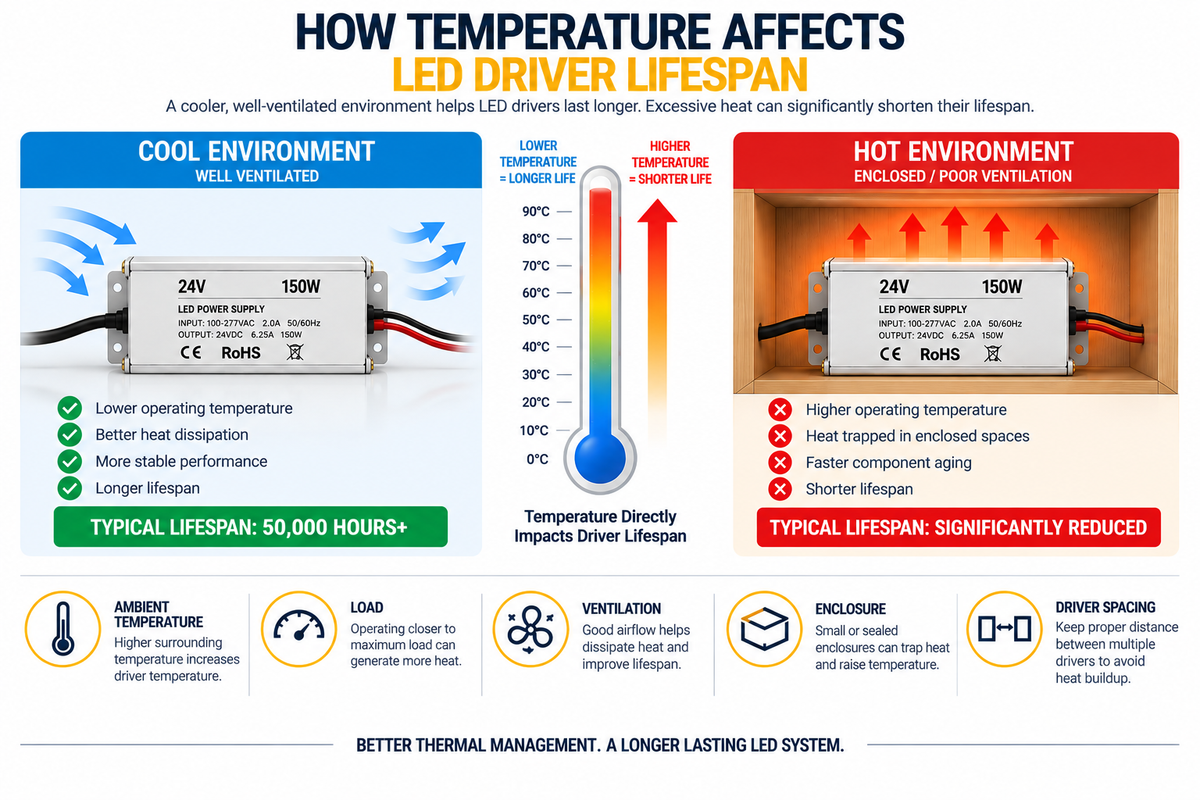
LED drivers are designed to operate for thousands of hours, but their actual service life can depend heavily on one factor:
Temperature.
An LED driver operating in a cool, properly ventilated location may experience very different conditions from the same driver installed inside a hot, enclosed ceiling cavity.
This is especially important in commercial LED projects where lighting may operate:
- 8 hours per day
- 12 hours per day
- 16 hours per day
- Or continuously in some applications
The longer the system operates, the more important thermal management becomes.
For contractors, electricians, lighting designers, and facility managers, understanding how temperature affects LED driver lifespan can help reduce premature failures and long-term maintenance costs.
Why Does Temperature Matter to an LED Driver?
An LED driver contains electronic components that convert and regulate electrical power.
Depending on the driver design, these components may include:
- Capacitors
- Switching components
- Transformers or inductors
- Rectifiers
- Control circuitry
- Protection components
These components generate some heat during normal operation.
When the surrounding environment is also hot, the driver's internal temperature can rise further.
Excessive temperature can accelerate aging of temperature-sensitive electronic components and reduce long-term reliability.
LED Drivers Naturally Produce Heat
No LED driver is 100% efficient.
Suppose a driver supplies:
150W
to an LED load.
If the driver is not perfectly efficient, some incoming electrical energy is converted into heat.
That heat must be transferred away from the internal components.
This is why driver enclosure design, mounting location, airflow, and surrounding temperature matter.
Ambient Temperature vs. Driver Temperature
These two temperatures should not be confused.
Ambient Temperature
The temperature of the air surrounding the driver.
Internal / Case Temperature
The temperature experienced by the driver's enclosure or internal components during operation.
A room may feel comfortable at:
72°F / 22°C
but a driver installed inside a small enclosed cabinet may operate in a much hotter local environment.
The temperature immediately around the driver is what matters—not simply the thermostat setting in the room.
What Is Ta on an LED Driver?
Some LED drivers specify an allowable ambient temperature range, often associated with:
Ta
which refers to ambient temperature.
For example, a manufacturer may specify an operating ambient range for a particular driver.
The driver should be installed within its specified environmental limits.
Do not assume every LED driver has the same allowable temperature range.
Always check the product documentation. The operating range for each of our LED drivers is listed on its product page.
What Is Tc?
Some drivers also identify a case temperature reference point, commonly called:
Tc
This provides a location where case temperature can be evaluated according to the manufacturer's specifications.
The allowable Tc value depends on the specific driver.
Exceeding specified thermal limits can reduce reliability and may violate the manufacturer's operating requirements.
Why Heat Can Shorten Driver Lifespan
Electronic components age faster when exposed to excessive temperature.
Electrolytic capacitors are one example of components that can be particularly temperature-sensitive.
Higher operating temperatures can accelerate degradation.
Over time, this can contribute to:
- Unstable output
- Flickering
- Dimming problems
- Difficulty starting
- Reduced output
- Intermittent operation
- Complete driver failure
Good thermal design therefore affects both immediate performance and long-term reliability.
Does Every 10°C Increase Cut Driver Life in Half?
You may sometimes hear a general electronics rule that a 10°C temperature increase can significantly accelerate component aging.
While temperature-versus-life relationships are useful engineering concepts, installers should not apply a universal “10°C = half the lifespan” rule to every LED driver.
Actual lifespan depends on:
- Driver design
- Components
- Capacitor ratings
- Operating load
- Thermal design
- Ambient temperature
- Manufacturer testing
Use the manufacturer's lifetime curves and temperature specifications when available.
Where Does Driver Heat Come From?
Driver temperature is influenced by several sources.
1. Internal Electrical Losses
Power conversion generates heat.
2. LED Load
Higher loading can increase internal thermal stress depending on the driver design.
3. Ambient Temperature
A hot room or ceiling cavity reduces the driver's ability to reject heat.
4. Nearby Equipment
Other drivers, transformers, lighting fixtures, or electrical equipment may add heat.
5. Poor Ventilation
Heat can accumulate when there is insufficient airflow.
6. Enclosures
A small enclosure can trap heat around the driver.
Driver Load and Temperature
A driver operating near its allowable output may produce different thermal conditions than one operating at a lower load.
This does not mean every driver should be dramatically oversized.
Instead, the driver should be selected according to:
- Connected LED load
- Manufacturer loading requirements
- Ambient conditions
- Dimming requirements
- Project environment
Proper sizing is part of thermal management. Our driver range runs from 30W to 300W so the capacity can be matched to the actual load rather than guessed.
Example: 150W LED Driver
Suppose a 150W driver is installed in two different locations.
Installation A
- Open service area
- Moderate ambient temperature
- Adequate airflow
- Proper mounting
Installation B
- Small sealed cabinet
- Nearby heat-producing equipment
- Limited airflow
- High ambient temperature
Even though both installations use the exact same driver and LED load, the driver in Installation B may operate at a significantly higher temperature.
That can affect long-term reliability.
Why Enclosures Matter
Drivers are often installed inside:
- Junction boxes
- Cabinets
- Ceiling spaces
- Electrical compartments
- Architectural millwork
- Equipment enclosures
An enclosure changes the thermal environment.
Heat generated by the driver may remain trapped inside the enclosure instead of dissipating into the surrounding space.
The smaller and more sealed the enclosure, the more carefully thermal conditions should be evaluated.
Do Not Confuse Environmental Protection With Cooling
An outdoor or IP-rated driver enclosure can protect against environmental exposure, but that does not automatically mean it will operate cooler. An IP65-rated driver is specified for the environment it sits in, not for the heat it produces.
A sealed enclosure can limit natural airflow.
For outdoor projects, both factors must be considered:
Environmental Protection + Thermal Management
A driver can be protected from moisture while still experiencing excessive heat if installed incorrectly.
Outdoor Temperature Can Be Much Higher Than Expected
Outdoor installations can expose drivers to high temperatures.
Consider a driver installed:
- In direct sunlight
- Inside a metal enclosure
- On a rooftop
- Near HVAC equipment
- Against a dark exterior surface
The local temperature around the driver may become significantly higher than the reported outdoor air temperature.
Direct solar exposure can be particularly important.
Whenever possible, follow manufacturer guidance regarding installation location and environmental conditions. For exterior and damp locations, start with a wet-location rated driver and then plan its position and shading.
Ceiling Cavities Can Become Hot
A driver installed above a ceiling may be surrounded by:
- Insulation
- Other lighting equipment
- Limited airflow
- HVAC ducts
- Building heat
Do not assume that because the occupied room is air-conditioned, the ceiling cavity is equally cool.
The actual driver location should be evaluated.
Insulation Can Create Problems
Drivers should not be buried in thermal insulation unless the specific product and installation method permit it.
Insulation can prevent heat from dissipating.
This may cause the driver enclosure and internal components to operate at higher temperatures.
Always follow:
- Manufacturer instructions
- Product ratings
- Applicable electrical codes
Multiple Drivers Installed Together
Commercial projects may require several drivers in one location.
For example:
Driver 1 – Zone 1
Driver 2 – Zone 2
Driver 3 – Zone 3
Driver 4 – Zone 4
If all four drivers are mounted tightly together inside a small enclosure, each driver contributes heat to the same space.
This can increase the local ambient temperature.
Provide appropriate spacing and ventilation according to product and project requirements. Distributing the load instead — one compact transformer near each zone — also spreads the heat out, and the zones can still be controlled together from one remote.
Driver Spacing Matters
Installing drivers directly against each other can restrict heat dissipation.
Where required, allow sufficient space around each unit.
The correct spacing depends on:
- Driver design
- Mounting orientation
- Enclosure
- Manufacturer requirements
- Ambient temperature
There is no universal spacing distance for every LED driver.
Mounting Surface Can Affect Heat Dissipation
The surface to which the driver is mounted may influence heat transfer.
A driver mounted to an appropriate metal surface may behave differently from one surrounded by insulating material.
However, installers should not assume that any metal surface automatically provides adequate thermal management.
Follow the manufacturer's mounting instructions.
Airflow Helps Remove Heat
Natural or designed ventilation can help prevent heat from accumulating around drivers.
Depending on the project, thermal planning may include:
- Ventilation openings
- Larger enclosures
- Better driver spacing
- Cooler installation locations
- Separation from heat-producing equipment
The objective is to maintain the driver within its specified operating temperature range.
What About Drivers With Junction Boxes?
Drivers or transformers with integrated or attached junction boxes can simplify professional installation and wiring.
However, they still require thermal consideration.
The junction-box design does not eliminate heat generation.
When planning the installation, check:
- Driver clearance
- Ambient temperature
- Accessibility
- Mounting method
- Ventilation
- Manufacturer specifications
How Dimming Can Affect Temperature
Driver temperature under dimming conditions depends on the specific driver and dimming architecture.
Different systems may use:
Do not assume that dimming always reduces driver temperature proportionally.
The driver must be compatible with the selected dimming method and operated within manufacturer specifications.
Dimmer Compatibility Still Matters
A driver that buzzes, flickers, or behaves abnormally when dimming may be experiencing a compatibility or installation problem.
Possible causes include:
- Incorrect dimmer type
- Improper loading
- Wiring issues
- Incompatible control method
Abnormal operation should be investigated rather than accepted as normal. Where the dimming protocol is not fixed at the design stage, a 5-in-1 dimmable driver covers several methods in one unit.
High Ambient Temperature + High Load
One particularly demanding situation is:
High Ambient Temperature + High Driver Load + Poor Ventilation
These conditions can combine to create significant thermal stress.
For example:
A heavily loaded driver inside a small enclosure located in a hot ceiling cavity has several thermal disadvantages simultaneously.
Good system design tries to avoid stacking these risk factors.
How Can You Tell If an LED Driver Is Too Hot?
Possible signs of thermal problems may include:
- Driver repeatedly shutting down
- Lights cycling on and off
- Flickering after operating for a period of time
- Performance changing as the system warms up
- Excessive enclosure temperature
- Premature driver failures
However, touch alone is not a reliable measurement.
Some properly operating drivers may feel quite warm.
The correct approach is to compare measured conditions with manufacturer specifications.
Thermal Protection
Some LED drivers include protective functions that may reduce output or shut the unit down when unsafe conditions occur.
This can help protect the driver.
But repeated thermal shutdown should not be treated as normal operation.
If a driver continually reaches thermal protection, investigate the cause.
Potential issues include:
- Overload
- High ambient temperature
- Poor ventilation
- Incorrect enclosure
- Installation near heat sources
Why Thermal Cycling Matters
Commercial lighting systems turn on and off repeatedly over their lifetime.
Each cycle may cause components to:
Heat Up → Cool Down → Heat Up Again
Repeated thermal cycling can create mechanical and electrical stress over time.
Stable operating conditions and proper thermal design can help support long-term reliability.
24/7 Applications Need Extra Attention
Some LED lighting operates for very long periods.
Examples include:
- Hotels
- Hospitals
- Security lighting
- Retail displays
- Signage
- Commercial common areas
For systems operating continuously or nearly continuously, thermal conditions become especially important.
A small thermal problem repeated thousands of hours can become a significant reliability issue.
Example: Retail Display Installation
Imagine a retail display containing:
- COB LED strips
- Controllers
- Several LED drivers
- Enclosed cabinetry
The drivers are hidden inside the cabinet.
The display looks clean, but there is almost no ventilation.
After several hours of operation, heat from:
- LED strips
- Drivers
- Controllers
accumulates inside the cabinet.
A better design may include:
- More driver spacing
- Ventilation
- Better component placement
- Aluminum channels for appropriate LED strip installations
- Accessible service areas
Thermal planning should be part of the cabinet design from the beginning.
Example: Commercial Cove Lighting
A large cove installation may use several high-capacity drivers.
Instead of mounting all drivers together in a hot inaccessible ceiling space, the project may benefit from a planned service location with appropriate environmental conditions.
This can improve:
- Accessibility
- Troubleshooting
- Replacement
- Thermal management
Driver location should be considered during the lighting design stage — as should the distance between each driver and its strip run, since a cooler location farther away can introduce voltage drop.
Can Aluminum LED Channels Help the Driver Stay Cooler?
Not directly.
Aluminum channels are primarily associated with the LED strip.
They can provide:
- Mounting
- Protection
- Diffusion
- Additional heat-spreading surface for the strip
But an aluminum channel does not directly cool a remote LED driver.
The driver requires its own appropriate thermal environment.
LED Strip Heat Still Matters to the Complete System
The strip and driver have separate thermal considerations.
A high-output LED strip installed in a poorly designed profile may operate hot. A larger-housing profile such as the BN256 offers more aluminum mass for high-output runs.
At the same time, its driver may also operate hot inside an enclosure.
A professional installation should therefore consider:
LED Strip Thermal Management
and
LED Driver Thermal Management
as separate but related design issues.
Driver Efficiency and Heat
More efficient power conversion generally means less energy is lost as heat.
However, efficiency varies by:
- Driver model
- Load
- Input conditions
- Design
Do not compare drivers solely by enclosure temperature.
Use manufacturer specifications when evaluating efficiency and thermal performance.
How to Improve LED Driver Lifespan
There is no single trick.
Reliable driver operation comes from good system design.
1. Select the Correct Driver
Match:
- Voltage
- Wattage
- Dimming method
- Environmental rating
2. Avoid Overloading
Calculate the actual LED load.
Use:
LED Load = Wattage per Foot × Total Length
Then select the driver according to manufacturer loading requirements. Our guide on building a complete LED lighting system works through this calculation step by step.
3. Respect Temperature Ratings
Check the driver's specified operating conditions.
4. Provide Appropriate Ventilation
Avoid trapping unnecessary heat around the driver.
5. Keep Drivers Away From Heat Sources
Where practical, avoid installing drivers immediately beside equipment that produces significant heat.
6. Plan Driver Spacing
Do not crowd multiple drivers together without considering thermal effects. Several smaller distributed transformers may be easier to space than one large unit.
7. Keep Drivers Accessible
Accessible drivers are easier to inspect, measure, troubleshoot, and replace.
8. Use the Correct Enclosure
The enclosure must satisfy both environmental and thermal requirements. A driver with an integrated junction box can handle the wiring enclosure requirement without adding a second sealed box around the driver.
9. Test the System Under Real Conditions
A system that works for five minutes may behave differently after several hours.
Allow the installation to operate and evaluate thermal performance.
Measure Temperature During Commissioning
For larger commercial projects, temperature measurements can be useful during system commissioning.
Check the driver after the lighting has operated long enough to approach normal operating conditions.
Compare measurements with the manufacturer's specifications.
This is much more useful than simply deciding that a driver “feels hot.”
Do Not Automatically Replace a Hot Driver With a Larger Driver
If a driver is overheating, first identify the cause.
Possible causes include:
- Overload
- Poor ventilation
- Excessive ambient temperature
- Incorrect installation
- Wrong driver type
- Electrical problems
A higher-wattage driver may not solve a poor thermal environment.
Correct the underlying design issue.
Maintenance Costs and Driver Temperature
Thermal management is also a financial issue.
Imagine a commercial project with:
50 LED drivers
If poor installation conditions cause premature failures, replacement may require:
- New drivers
- Electrician labor
- Lifts
- Ceiling access
- Store downtime
- Troubleshooting
- Repeated service visits
A small amount of thermal planning during installation can potentially reduce significant maintenance problems later.
Driver Accessibility + Temperature Management
A good driver location should ideally provide both:
Appropriate Thermal Conditions
and
Service Access
Do not solve one problem by creating another.
For example:
Moving a driver into an inaccessible cavity just because the area is cooler can create maintenance problems.
The complete project should balance:
- Temperature
- Safety
- Wiring distance
- Accessibility
- Environmental protection
Commercial Installation Checklist
Before completing an LED driver installation, confirm:
Driver Selection
- Correct output voltage
- Sufficient wattage
- Correct dimming method
- Appropriate environmental rating
Load
- Total LED load calculated
- Driver loading within specifications
- Controller capacity checked
Temperature
- Ambient conditions acceptable
- Driver not exposed to excessive external heat
- Manufacturer thermal limits understood
Installation
- Appropriate ventilation
- Adequate driver spacing
- Correct mounting
- Suitable enclosure
- No improper insulation coverage
Maintenance
- Driver accessible
- Wiring labeled
- Driver zones documented
- Replacement possible without major demolition
Common Thermal Management Mistakes
Avoid:
- Installing drivers in tiny sealed spaces without evaluating heat
- Burying drivers in insulation when not permitted
- Mounting multiple high-power drivers tightly together
- Ignoring ambient-temperature specifications
- Assuming room temperature equals driver ambient temperature
- Installing outdoor drivers in direct solar heat without considering temperature
- Overloading the driver
- Ignoring repeated thermal shutdown
- Assuming a warm enclosure automatically means failure
- Judging temperature only by touch
- Hiding drivers where they cannot be inspected
- Ignoring manufacturer thermal specifications
Think About Temperature Before Installation
Thermal problems are much easier to prevent during design than after construction.
Before installing the driver, ask:
- How much LED load will it power?
- How many hours per day will it operate?
- What is the actual ambient temperature around the driver?
- Is the location ventilated?
- Is the driver inside an enclosure?
- Are other heat sources nearby?
- Are multiple drivers installed together?
- Can the driver be accessed later?
- Does the location meet manufacturer requirements?
- Can operating temperature be checked during commissioning?
These questions can prevent many avoidable reliability problems.
Conclusion
Temperature is one of the most important environmental factors affecting LED driver reliability and lifespan.
LED drivers naturally generate heat while converting electrical power.
When that heat is combined with:
- High ambient temperature
- Heavy loading
- Poor ventilation
- Small enclosures
- Nearby heat sources
- Improper installation
the driver's operating temperature can increase significantly.
The solution is not simply to choose the largest driver available.
A reliable system requires the correct combination of:
Driver Sizing + Load Management + Ventilation + Installation Location + Environmental Protection + Accessibility
For commercial LED projects, thermal planning should begin before the drivers are installed.
A properly selected driver operating within its specified temperature range and installed in an appropriate environment is more likely to provide stable, reliable performance over the long term.
If you would like help matching a driver to a project's load, dimming method, and installation environment, contact our team for specification support and wholesale pricing.
Frequently Asked Questions
Does heat shorten LED driver lifespan?
Excessive operating temperature can accelerate the aging of electronic components and reduce long-term reliability.
How hot should an LED driver get?
There is no universal temperature for all drivers. Check the manufacturer's ambient and case-temperature specifications for the specific model — these are listed on each of our driver product pages.
Is it normal for an LED driver to feel warm?
Yes, drivers generate heat during normal operation and may feel warm. Touch alone cannot determine whether the driver is operating outside its thermal limits.
Can I install an LED driver inside a cabinet?
Potentially, if the installation meets the driver's environmental, ventilation, clearance, and temperature requirements. Compact transformers are often easier to accommodate in millwork.
Can I cover an LED driver with insulation?
Only when the specific product and installation method permit it. Otherwise, insulation may trap heat and create unsafe operating conditions.
Do outdoor LED drivers overheat?
They can. Direct sunlight, hot surfaces, sealed enclosures, and high outdoor temperatures can create demanding thermal conditions. Use a wet-location rated driver and plan its position carefully.
Will using a larger LED driver solve overheating?
Not necessarily. If the problem is poor ventilation, high ambient temperature, or improper installation, simply increasing driver wattage may not correct the underlying cause.
How can I improve LED driver lifespan?
Use a properly sized and compatible driver, operate it within manufacturer temperature limits, provide appropriate ventilation and spacing, avoid excessive heat sources, and maintain service access.