
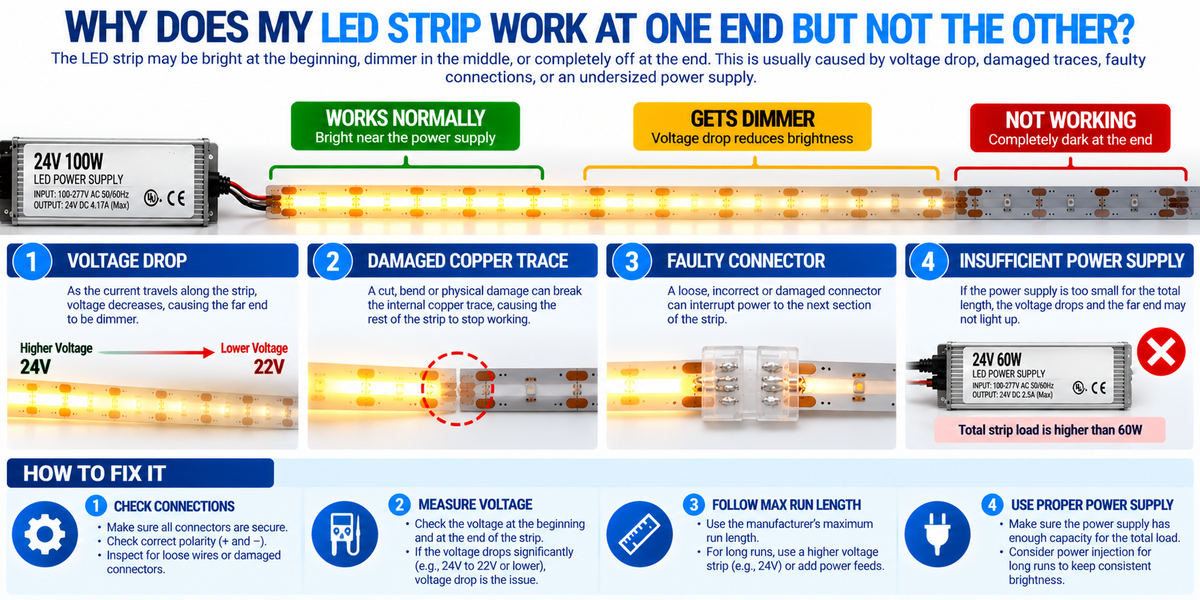
Why Does My LED Strip Work at One End but Not the Other? Causes & Fixes
You install an LED strip, connect the power supply, and turn on the lights.
The beginning of the strip works perfectly.
But toward the other end, something is wrong.
Maybe the LEDs gradually become dimmer. Perhaps the last few feet flicker. Or one entire section stays completely dark.
Why does an LED strip work at one end but not the other?
This is a common troubleshooting question for electricians, lighting contractors, and homeowners.
The problem can affect many types of LED strip lights, including:
- COB LED strips
- Single-color LED strips
- CCT tunable-white strips
- RGB and RGBW LED strips
- Waterproof LED strips
- Long architectural lighting runs
The most important thing to understand is that a gradual loss of brightness and a sudden dark section usually point to different types of problems.
Gradual dimming often suggests voltage drop, while a sudden interruption may indicate a damaged circuit, failed connection, or defective strip section.
In this guide, we'll explain the most common causes and how to troubleshoot them.
1. First, Identify What the LED Strip Is Doing
Before replacing the driver or LED strip, look closely at the pattern of the failure.
Different symptoms can help narrow down the cause.
| Symptom | Possible Cause |
|---|---|
| Strip gradually becomes dimmer | Voltage drop |
| Last few feet are completely dark | Damaged trace, connection, or strip section |
| Strip stops working immediately after a connector | Faulty connector or wiring |
| Only one color stops working | Damaged color channel or controller issue |
| End of strip flickers | Voltage drop, poor connection, or unstable supply |
| Strip works when moved or pressed | Intermittent connection or damaged PCB |
| Strip shuts off after operating for a while | Thermal or electrical protection issue |
These are diagnostic clues, not definitive diagnoses.
Several problems can produce similar symptoms.
2. Voltage Drop: The Most Common Cause of Gradual Dimming
One of the most frequent causes of uneven LED strip brightness is voltage drop.
LED strips contain electrical conductors that distribute power along their length.
As current travels through these conductors, electrical resistance causes some voltage to be lost.
The farther the current travels, the greater the potential voltage drop.
Example
Consider a 24V COB LED strip powered from one end.
At the beginning of the strip, the voltage is close to the driver's output.
Farther along the strip, the voltage may decrease.
Depending on the strip's electrical design, the result can be:
- Reduced brightness
- Uneven illumination
- Color changes in multi-channel systems
How to Fix Voltage Drop
Possible solutions include:
- Shortening the continuous strip run
- Supplying power from an additional approved feed point
- Using appropriately sized power wiring
- Dividing the installation into multiple runs — a multi-output transformer provides a separate terminal for each
- Following the manufacturer's maximum run-length specifications
Important: A higher-wattage driver alone does not eliminate voltage drop along the strip. Our guide on whether you can use a bigger power supply explains why.
3. Why 12V LED Strips May Show More Voltage Drop Than 24V
For the same power consumption, a 12V system draws more current than a 24V system.
The basic formula is:
Current (A) = Power (W) ÷ Voltage (V)
Example: 120W LED Load
12V System
120W ÷ 12V = 10A
24V System
120W ÷ 24V = 5A
The 24V system draws half the current.
Lower current can help reduce voltage loss in connecting wires of the same resistance.
However, actual voltage drop along an LED strip also depends on its internal conductor design and current distribution.
Therefore, a 24V strip is not automatically suitable for every long installation.
Always verify its maximum recommended run length. Our guide on when to use 12V COB strip compares the two systems.
4. A Broken Copper Trace Inside the LED Strip
If an LED strip suddenly stops working at a particular point, the flexible PCB may have a damaged copper trace.
LED strips use thin conductive paths to distribute electrical power.
These traces can be damaged by:
- Excessive bending
- Sharp folding
- Improper cutting
- Mechanical pressure
- Installation stress
- Manufacturing defects
Typical Symptom
The strip works normally until a specific location.
Everything beyond that location is dark.
A broken power-distribution trace may prevent electricity from reaching downstream sections.
How to Troubleshoot
Disconnect the power supply before inspecting the strip.
Look for:
- Visible cracks
- Torn copper pads
- Burn marks
- Damaged solder joints
- Sharp folds
A qualified technician may use appropriate electrical testing methods to identify a break.
Depending on the strip design, the damaged section may need replacement. Where a run must turn a corner, a bendable profile or a corner channel avoids the sharp folds that cause this damage.
5. A Faulty LED Strip Connector
Solderless connectors are convenient, but an improperly installed connector can interrupt electrical continuity.
This is especially common when two strip sections are joined.
For example:
LED Strip A → Connector → LED Strip B
Strip A works.
Strip B does not.
The problem may be the connector rather than the second strip.
Common Connector Problems
- Incorrect strip width
- Poor contact with copper pads
- Misaligned contacts
- Incomplete insertion
- Loose locking mechanism
- Damaged connector
- Incompatible pad layout
How to Fix It
With power disconnected:
- Verify connector compatibility.
- Inspect the strip's copper pads.
- Check the alignment.
- Confirm the connector is fully secured.
- Inspect for damage or overheating.
Replace damaged or unsuitable connectors with one matched to the strip — we stock versions for 8mm and 10mm single-color COB, RGB, CCT and RGBW strips.
6. Poor Solder Connections
Soldered connections can also fail.
A poorly formed solder joint may have high electrical resistance or intermittent contact.
Possible causes include:
- Insufficient solder wetting
- Mechanical stress
- Damaged copper pads
- Excessive soldering heat
- Inadequate strain relief
Typical Symptoms
- Flickering near the joint
- Downstream section not lighting
- Intermittent operation
- Abnormal localized heating
Recommended Solution
Inspect the connection with power disconnected.
If the joint is defective, it may need to be repaired or replaced using a manufacturer-approved method.
For professional installations, ensure the connection is insulated and mechanically supported. Our guide on connecting LED strips after cutting covers both methods in detail.
7. Cutting the LED Strip at the Wrong Location
Most cuttable LED strips have designated cutting points.
These locations are usually marked with:
- Scissor symbols
- Printed cutting lines
- Copper pads
Cutting outside an approved location can damage a circuit section.
Example
A COB strip is designed to be cut every 25mm.
If the strip is cut between those points, some LEDs or conductive paths may no longer operate correctly.
How to Prevent This
Always identify the approved cutting interval before installation. It is listed on each product page, and our free-cut 8mm COB strip can be cut at any point.
For precise cabinet, shelving, or aluminum channel projects, account for the strip's cutting interval during measurement.
8. Why COB LED Strips May Stop Working at One Point
COB LED strips provide smooth, continuous-looking illumination.
However, they still contain electrical circuits beneath the light-emitting surface.
Possible causes of a dark COB section include:
- Damaged flexible PCB
- Broken copper traces
- Poor connections
- Voltage drop
- Failed circuit components
- Moisture damage
Because COB strips have a continuous-looking light-emitting layer, some electrical damage may not be immediately visible.
Contractor Tip
Do not repeatedly bend or press a defective COB strip to make it illuminate.
If the strip responds to movement, an intermittent electrical connection may be present.
Disconnect power and investigate the problem.
9. Is the LED Driver Too Small?
An undersized LED driver may be unable to supply the total connected load.
This can lead to:
- Voltage reduction
- Flickering
- Protection shutdown
- Unstable operation
- Failure to reach full brightness
However, an undersized driver does not always cause only the far end of the strip to fail.
A localized dark section is often more consistent with a circuit or connection problem. Our guide on what happens when an LED driver is overloaded covers the symptoms.
How to Check Driver Capacity
Calculate the total LED load:
Total Wattage = Wattage per Foot × Strip Length
Example
A 24V COB LED strip consumes 4W per foot.
Total length:
30 feet
Required LED power:
30 × 4W = 120W
The driver must support the required load under the applicable operating conditions.
If an 80% loading target is appropriate:
120W ÷ 0.80 = 150W
A compatible 150W driver could meet that illustrative target.
However, follow the driver's actual loading and derating requirements. Our guide on how many feet one driver can power works through the calculation.
10. Can a Bigger LED Driver Fix a Dark Strip End?
Not necessarily.
A higher-capacity driver may help if the original driver is overloaded or unable to maintain its rated output.
But if the problem is caused by:
- A broken copper trace
- A damaged connector
- Excessive strip run length
- A defective section
a bigger driver may not solve it.
For example:
A 24V strip may receive adequate power at the beginning but experience voltage drop along an excessively long run.
Replacing a 150W driver with a 300W driver at the same regulated output voltage does not remove the resistance of the strip conductors.
The electrical distribution must be corrected.
11. Can Power Injection Fix the Problem?
Power injection can help when the problem is caused by excessive voltage drop.
Power injection means supplying electrical power at additional points along a compatible LED strip installation, usually run with jumper wire and connectors.
For example:
24V Driver → LED Strip Beginning
24V Driver → Additional Approved Feed Point
This can reduce the distance that current must travel through the strip's internal conductors.
Important Safety Considerations
- Follow the strip manufacturer's wiring diagram.
- Verify the driver has sufficient capacity.
- Use appropriate wire sizes.
- Consider branch protection requirements.
- Maintain correct polarity.
- Do not connect separate power supply outputs together unless specifically permitted.
Power injection should be designed—not improvised. A transformer with separate output channels makes this straightforward.
12. Can You Power an LED Strip from Both Ends?
Some LED strip systems permit power to be supplied at both ends.
This can help reduce voltage drop and improve brightness uniformity.
However, it is not universally appropriate.
The manufacturer must support the arrangement, and the wiring must be designed correctly.
Example
A long 24V COB strip may receive power at both ends from an appropriately designed common supply arrangement.
This can reduce the maximum distance current travels along the strip.
But it does not automatically increase the manufacturer's approved maximum installation length.
The complete system must remain within its electrical and thermal ratings.
13. Why RGB LED Strips Work at One End but Show Wrong Colors at the Other
RGB and RGBW strips use multiple electrical channels.
If voltage drop or connection resistance affects those channels differently, the color may change along the strip.
For example:
The beginning displays white.
The far end appears reddish or another unintended tint.
Possible causes include:
- Voltage drop
- Damaged channel conductor
- Poor connection
- Controller configuration
- Excessive run length
Troubleshooting
Check each channel individually using a compatible controller.
If one color fails only after a particular point, investigate that channel's electrical continuity. Our guide on why LED lights look different colors covers related causes.
14. Why Only Part of a CCT LED Strip Works
Tunable-white LED strips use warm-white and cool-white channels.
If one channel is interrupted, the strip may produce the wrong color temperature or fail to illuminate correctly.
For example:
The warm-white channel works.
The cool-white channel stops operating after a connector.
The result may be an unexpected warm appearance rather than a completely dark strip.
Check the channel wiring and connector compatibility, and confirm the CCT controller settings.
15. Addressable LED Strips: Data Signal Problems
Addressable LED strips have additional troubleshooting considerations.
Some addressable strips use a directional data signal that travels from one pixel or segment to the next.
If the data path fails, downstream pixels may stop responding.
Common Causes
- Incorrect data direction
- Damaged data conductor
- Failed pixel or control IC
- Controller incompatibility
- Signal integrity problems
- Inadequate power distribution
Important Difference
For an addressable strip, a dark downstream section does not always mean the power conductors are broken.
The data signal may be interrupted.
Follow the manufacturer's diagnostic and wiring instructions.
16. Can Overheating Cause Part of an LED Strip to Fail?
Yes.
Excessive operating temperatures can accelerate degradation of LEDs and circuit components.
Potential causes include:
- High-power operation
- Poor heat dissipation
- Inappropriate mounting surfaces
- Excessive ambient temperature
- Inadequate thermal design
Some failures may affect only one section.
How Aluminum Channels Can Help
Suitable aluminum channels can help spread heat away from LED strips.
They can also provide:
- Mechanical protection
- Straight mounting
- Diffuser compatibility
- A professional appearance
However, a channel does not guarantee proper thermal performance for every strip — a larger profile such as the BN256 offers more aluminum mass than a shallow extrusion.
Follow the product's mounting and operating-temperature requirements. Our guide on how aluminum channels help extend LED strip lifespan explains the mechanism.
17. Waterproof LED Strips: Moisture Damage at Connections
Outdoor and water-resistant LED strips may develop problems when moisture enters damaged or improperly sealed connections.
Possible symptoms include:
- Intermittent illumination
- Corrosion
- Dark sections
- Color changes
- Electrical faults
Common Problem Areas
- Cut ends
- Solder joints
- Connectors
- Cable entries
- Damaged protective coatings
Important
Cutting and reconnecting an IP-rated LED strip may compromise its original environmental protection.
Use approved sealing methods and suitable connection accessories — a waterproof IP65 channel adds protection for the finished run.
Do not assume ordinary electrical tape restores the original IP rating. Our guide on whether waterproof LED strips can be used in the rain covers the complete system.
18. Why an LED Strip Works When You Press It
If pressing or moving part of an LED strip temporarily restores illumination, the strip may have an intermittent electrical connection.
Possible causes include:
- Cracked copper trace
- Loose connector
- Damaged solder joint
- Fractured PCB
- Internal component failure
This symptom should not be ignored.
Repeatedly pressing or bending the strip can worsen the damage.
Disconnect power and inspect or replace the affected section as appropriate.
19. How to Test Voltage Drop Along an LED Strip
A qualified technician can investigate voltage drop by measuring the voltage at appropriate test points.
For a constant-voltage strip, measurements may be taken near the supply end and at accessible downstream locations.
Example
Nominal supply:
24V DC
Measured near the strip input:
23.9V
Measured near the far end:
22.2V
Difference:
23.9 − 22.2 = 1.7V
Percentage relative to the input measurement:
1.7 ÷ 23.9 × 100 ≈ 7.1%
This indicates a substantial voltage difference along the run.
Whether the actual performance is acceptable depends on the strip's design and specifications.
Safety Note
Electrical measurements should be performed by qualified personnel using suitable equipment.
Avoid probing exposed energized conductors unless the procedure can be carried out safely.
20. How to Identify a Broken Section
A completely dark downstream section may indicate a circuit interruption.
A technician may investigate:
- The last working section
- The first nonworking section
- The nearest connector
- The strip's designated electrical pads
- Visible PCB damage
The objective is to determine whether the problem is in the strip itself or in an external connection.
Do not assume that every dark section can be repaired by cutting and reconnecting.
Some failures require replacement.
21. Should You Replace the Entire LED Strip?
Not always.
The correct decision depends on the cause.
A Connector Problem
A suitable replacement connector may resolve the issue.
A Damaged Strip Section
If the strip supports cutting and reconnection, a damaged section may be replaceable.
Extensive Moisture Damage
Replacing the affected assembly may be more appropriate.
Severe Overheating
The underlying thermal or electrical problem must be corrected before replacement.
Long-Term Color Matching
For visible architectural installations, replacing only one section may create a color difference between new and aged LEDs.
Consider color consistency when planning repairs, and keep spare material from the same batch where practical.
22. Troubleshooting LED Strip Problems Step by Step
Use the following sequence to identify the cause.
Step 1: Observe the Failure Pattern
Does the strip gradually dim, suddenly stop, or flicker?
Step 2: Disconnect Power
Isolate the electrical supply before handling the strip or its connections.
Step 3: Check the Product Specifications
Verify the rated voltage, maximum run length, and wiring requirements on the strip's product page.
Step 4: Inspect Connectors
Look for loose, misaligned, or damaged connections.
Step 5: Inspect the Strip
Check for cuts, sharp bends, damaged PCB sections, or signs of overheating.
Step 6: Verify Driver Capacity
Calculate the connected wattage and compare it with the driver's ratings.
Step 7: Check the Controller
For RGB, RGBW, CCT, or addressable systems, verify the controller and channel configuration.
Step 8: Evaluate Voltage Drop
Have a qualified technician measure the system where appropriate.
Step 9: Correct the Root Cause
Repair or replace the defective component using approved methods.
Step 10: Test the Complete Installation
Confirm proper operation at the highest intended load.
23. Troubleshooting Comparison Table
| Problem | Likely Area to Investigate | Possible Solution |
|---|---|---|
| Gradually dimming strip | Voltage drop | Shorter runs or approved additional feeds |
| Sudden dark section | PCB trace or failed section | Inspect and replace damaged section |
| Darkness after connector | Connector contact | Reinstall or replace compatible connector |
| Flickering at one joint | Poor connection | Correct the termination |
| Wrong color at far end | Voltage drop or channel fault | Check feeds and channel continuity |
| RGB strip stops after one pixel | Addressable data path | Inspect data direction and pixel operation |
| Outdoor strip partially fails | Moisture ingress | Inspect sealing and replace damaged parts |
| Strip shuts down after warming | Thermal or protection issue | Check operating temperature and load |
24. How to Prevent Partial LED Strip Failures
The best way to avoid these problems is to plan the electrical and mechanical installation correctly.
Follow Maximum Run Lengths
Do not exceed the manufacturer's supported continuous-run limits.
Use Compatible Drivers
Match voltage, capacity, dimming, and environmental requirements.
Avoid Sharp Bends
Follow the strip's permitted bend radius, or use a bendable profile for curves.
Use Suitable Connectors
Match the strip width, pad layout, and electrical channel count.
Plan Voltage Drop
Calculate wiring losses and consider additional feed points where appropriate.
Manage Heat
Use suitable mounting methods and thermal management.
Protect Outdoor Connections
Follow the manufacturer's sealing instructions.
Test Before Final Installation
Verify operation before closing aluminum channels, installing diffusers, or completing architectural finishes.
25. Why This Matters in Commercial LED Projects
Partial LED strip failures can be especially costly in large installations.
Examples include:
- Shopping malls
- Retail stores
- Hotels
- Restaurants
- Offices
- Commercial lobbies
- Display cases
- Architectural coves
A dark section in a long architectural lighting run can create an obvious visual defect.
Repairs may also require access equipment, removal of finishes, or interruption of business operations.
Professional Recommendations
For commercial installations:
- Standardize LED strip models and voltages.
- Plan driver locations.
- Calculate maximum run lengths.
- Use compatible connectors and wiring.
- Keep service points accessible where practical.
- Document lighting zones.
- Test the complete installation.
- Maintain suitable replacement material.
Good installation planning reduces the risk of difficult and expensive repairs.
26. BrightNex LED Solutions for Reliable Strip Installations
BrightNex LED provides lighting components for residential and commercial applications, including:
- 12V COB LED strip lights
- 24V COB LED strip lights
- Single-color LED strips
- CCT LED strips
- RGB and RGBW LED strips
- Compatible LED drivers
- Dimmable transformers
- Aluminum LED channels
- LED controllers and remotes
For contractors and project buyers, selecting compatible components and following proper installation practices helps maintain uniform lighting performance.
Explore professional lighting solutions in our COB strip, connector and driver collections, or contact our team for project support and wholesale pricing.
Final Takeaway
So, why does an LED strip work at one end but not the other?
The answer depends on the failure pattern.
If the strip gradually becomes dimmer, investigate voltage drop.
If the strip suddenly stops working at a particular point, investigate damaged traces, connectors, or circuit sections.
For RGB, RGBW, CCT, and addressable strips, controller and channel problems may also be responsible.
The most important factors are:
Voltage Drop + Connection Quality + PCB Integrity + Driver Capacity + Proper Installation
Rather than immediately replacing the driver or entire strip, identify the root cause.
A systematic troubleshooting approach can reduce unnecessary replacement costs and help restore reliable, uniform illumination. Our guide on building a complete LED lighting system covers how the parts fit together.
Frequently Asked Questions
Why is my LED strip bright at the beginning but dim at the end?
Voltage drop is a common cause. As current travels through the strip, resistance can reduce the voltage available farther along the run.
Why does half of my LED strip not work?
Possible causes include damaged copper traces, failed circuit sections, faulty connectors, or electrical interruptions.
Can a bad LED strip connector cause the rest of the strip to stop working?
Yes. A poor connection can interrupt power or control signals to downstream sections. Use a connector matched to the strip's width and channel count.
Will a bigger LED driver fix a dark section?
Not necessarily. A larger driver may help if the original supply is overloaded, but it will not repair broken traces or faulty connections.
Can I power an LED strip from both ends?
Some systems permit this arrangement. Follow the manufacturer's instructions and use an appropriately designed power distribution system.
Why does my COB LED strip stop working halfway?
Possible causes include PCB damage, defective connections, failed circuit components, or voltage-drop problems.
Why does my LED strip work when I press it?
This may indicate an intermittent connection, damaged solder joint, or cracked PCB trace.
Can I repair a broken LED strip?
Some cuttable strips can be repaired by replacing damaged sections or connectors, provided the manufacturer permits the connection method. See our guide on connecting LED strips after cutting.
Why does my RGB LED strip change color at the far end?
Voltage drop, channel resistance, damaged wiring, or controller issues may cause inconsistent colors.
Why do addressable LED strips stop working after one point?
A damaged data connection, failed pixel, or signal problem can prevent downstream LEDs from responding.
Can overheating cause LED strip sections to fail?
Yes. Excessive temperature can accelerate component degradation and contribute to localized failures.
How can I prevent LED strips from becoming dim at the end?
Follow maximum run lengths, use appropriate wiring, plan suitable power feeds, and verify voltage drop during installation.