
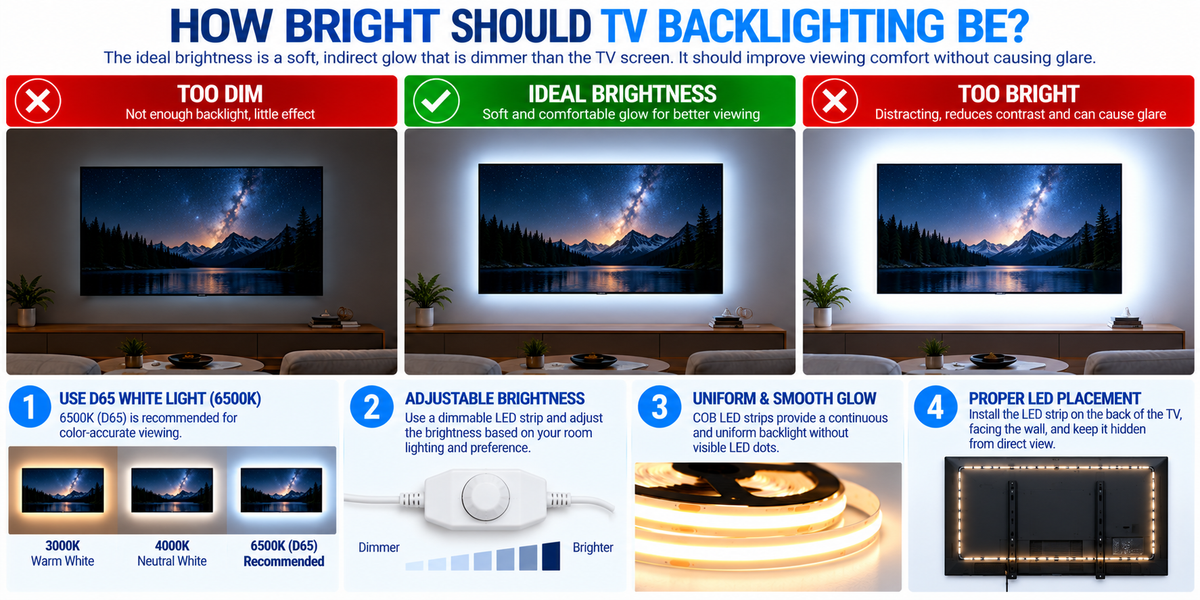
How Bright Should TV Backlighting Be? The Complete LED Strip Lighting Guide
LED backlighting behind a television can transform the appearance of a living room, home theater, gaming setup, or entertainment space.
But one of the most common questions is:
How bright should TV backlighting actually be?
Should the LED strip be as bright as the television? Should it illuminate the entire wall? Or should it produce only a subtle glow?
The answer depends on whether your goal is comfortable TV viewing, accurate picture perception, or decorative ambient lighting.
For most viewing environments, TV backlighting should be soft, indirect, and noticeably dimmer than the brightest parts of the television image.
Professional bias-lighting recommendations often use a wall illumination target of approximately 10% of the display's reference white luminance, measured under appropriate conditions.
However, that is a calibrated reference, not a universal dimmer percentage.
In this guide, we explain how to choose the right TV backlight brightness, color temperature, LED strip type, and installation method for professional results.
1. What Is TV Backlighting?
TV backlighting, also called bias lighting, refers to light installed behind a television to illuminate the wall surrounding the screen.
Unlike a room lamp or ceiling fixture, bias lighting produces indirect illumination.
A typical setup looks like this:
LED Driver → LED Strip → Reflected Light on the Wall Behind the TV
The light is usually hidden behind the television, allowing the wall to glow without exposing the LED strip directly.
Common applications include:
- Living room televisions
- Home theaters
- Gaming setups
- Media rooms
- Hotel entertainment areas
- Commercial display installations
When installed correctly, the result is a soft halo around the screen.
2. Why TV Backlighting Brightness Matters
The brightness of your TV backlight affects the overall viewing experience.
If the Backlighting Is Too Bright
Excessive illumination may:
- Distract from the television image
- Make dark scenes feel less immersive
- Create visible glare
- Produce uneven bright spots
- Change the perceived appearance of screen contrast
If the Backlighting Is Too Dim
Very weak illumination may provide little benefit compared with watching in a completely dark room.
The Ideal Balance
The goal is to create enough light behind the television to provide a comfortable visual environment without competing with the image.
A good TV backlight should support the viewing experience—not become the main attraction.
3. How Bright Should TV Bias Lighting Be?
For color-critical viewing, a commonly used reference is a surround luminance of approximately 10% of the display's reference white luminance.
For example, if a display is calibrated to a reference white luminance of 100 cd/m², a corresponding reference surround target would be approximately 10 cd/m².
This describes the luminance of the illuminated background—not the wattage of the LED strip or the brightness percentage shown in a controller app.
The correct setting depends on the display, viewing conditions, wall reflectance, and lighting geometry.
What About a 10% Brightness Setting?
A common misunderstanding is that the LED controller should always be set to 10%.
That is not necessarily correct.
A controller set to 10% output does not guarantee the wall is illuminated to the appropriate reference level.
For example:
- A powerful LED strip at 10% may still be too bright.
- A low-output strip at 10% may be barely visible.
- A dark wall may reflect less light than a white wall.
For everyday home viewing, begin with a low brightness setting and adjust until the wall has a subtle, comfortable glow.
4. Recommended TV Backlighting for Different Uses
| Application | Suggested Approach | Main Goal |
|---|---|---|
| Movies in a dark room | Soft, low-level white bias lighting | Comfortable viewing |
| Everyday television | Subtle to moderate indirect lighting | Balanced room illumination |
| Gaming setup | Adjustable brightness | Comfort and atmosphere |
| Color-critical viewing | Calibrated D65-compatible lighting | Consistent color perception |
| Decorative RGB setup | Adjustable color and intensity | Visual effect |
| Commercial TV display | Controlled, uniform wall lighting | Consistent presentation |
These are application guidelines, not fixed brightness percentages.
5. What Color Temperature Is Best for TV Backlighting?
Color temperature is one of the most important considerations.
For accurate video viewing, D65 is the standard reference white point used in many television and video production workflows.
D65 has a correlated color temperature of approximately 6500K.
This is why specialized bias lighting often targets D65. Our CCT-adjustable COB strip tunes up to 6500K, and the 12V COB series is available in a fixed 6500K version.
Does Any 6500K LED Strip Work?
Not necessarily.
Two LED strips labeled 6500K can have different spectral characteristics and color tints.
For color-critical viewing, look for products with suitable chromaticity accuracy and color-quality specifications.
A generic 6500K LED strip may provide a useful approximate appearance, but it should not automatically be considered a calibrated D65 light source.
What About 3000K or 4000K?
Warm-white and neutral-white strips can be used for decorative TV lighting.
However, they do not match the D65 reference white point used for color-critical viewing.
For a cozy living room, warm-white ambient lighting may be an intentional design choice.
For accurate picture perception, D65-oriented bias lighting is preferable. Our guide on why LED lights look different colors explains how two strips with the same rating can still differ.
6. Should TV Backlighting Be White or RGB?
Both can be useful, but they serve different purposes.
White LED Backlighting
Best suited for:
- Movie watching
- General television viewing
- Color-sensitive work
- Subtle architectural lighting
- Comfortable indirect illumination
A consistent white backlight provides a relatively neutral visual surround.
RGB LED Backlighting
Best suited for:
- Gaming rooms
- Decorative entertainment setups
- Dynamic lighting effects
- Personalized room colors
RGB lighting can create dramatic effects, but saturated colors around a television may influence perceived screen colors.
Which Should You Choose?
For accurate viewing: Choose appropriate white bias lighting.
For entertainment and decoration: RGBW lighting offers more creative flexibility while keeping a dedicated white channel.
RGB systems with dynamic screen synchronization may be visually engaging, but they are not a substitute for neutral bias lighting when color accuracy is the priority.
7. Are COB LED Strips Good for TV Backlighting?
Yes. COB LED strips can be an excellent choice for TV backlighting.
COB stands for Chip on Board.
These strips use densely arranged LED chips beneath a continuous-looking light-emitting layer.
This design can produce a smooth, uniform line of illumination.
Advantages of COB LED Strips
- Smooth-looking light output
- Reduced appearance of individual LED dots
- Flexible installation around suitable TV mounting layouts
- Compact profile
- Available in different white color temperatures
- Compatible with many low-voltage lighting systems
For professional TV installations, COB strips can create a clean lighting effect when positioned correctly.
Do You Need a High-Wattage COB Strip?
Usually not.
TV bias lighting often requires only modest light output.
A high-output strip can still work if it has suitable dimming capability, but it may add unnecessary power capacity and heat.
Select the strip based on the actual installation requirements — an ultra-slim 6.5mm COB strip is often a better fit behind a television than a high-output profile.
8. Where Should LED Strips Be Installed Behind a TV?
The most common method is to attach compatible LED strips to the back of the television or to a suitable mounting structure.
The LEDs should face toward the wall rather than directly toward viewers.
Common Installation Layouts
Three-Sided Layout
LED strips run along the top and two sides of the television.
This can be useful when the television is mounted near furniture that blocks the lower wall.
Four-Sided Layout
LED strips run around all four sides.
This can provide a more complete halo when the wall and mounting arrangement allow it.
Corners can be turned with short jumper wires and connectors rather than sharply folding the strip. Our guide on connecting LED strips after cutting covers the method.
Partial Layout
A shorter strip may illuminate only a selected area behind the television.
This can work for decorative applications but may produce less uniform bias lighting.
Installation Tip
Position the strip far enough inward from the TV edges that the LEDs remain hidden from normal viewing angles.
The ideal setback depends on the television design and distance from the wall.
9. How Far Should the TV Be from the Wall?
The distance between the television and wall affects the light distribution.
A television mounted very close to the wall may create a narrow, concentrated halo.
A television mounted farther away may produce a broader glow.
General Effects
| TV-to-Wall Distance | Typical Lighting Effect |
|---|---|
| Very close | Narrower halo; possible concentrated areas |
| Moderate | Broader, more blended illumination |
| Farther away | Wider spread, potentially lower wall brightness |
There is no single ideal distance for every television.
The final result depends on strip position, LED beam distribution, wall color, and brightness.
For a professional installation, test the lighting before permanently mounting the strip.
10. How Wall Color Affects TV Backlighting
Wall color can significantly change the apparent brightness and color of the reflected light.
White Walls
White walls generally reflect more light and can create a bright, even halo.
Light Gray Walls
Neutral light-gray walls can provide a useful viewing surround when their reflectance and color are appropriate.
Dark Walls
Dark walls absorb more light.
The same LED strip may appear much dimmer behind a TV mounted on a dark wall — a higher-output strip may be needed to achieve the same halo.
Colored Walls
Colored walls can tint the reflected light.
For example, a warm beige wall may make a nominally white LED strip appear warmer.
For color-critical viewing, a neutral wall surface is preferable.
11. How Many Feet of LED Strip Do You Need Behind a TV?
The required length depends on the television's physical dimensions and your chosen layout.
Television sizes are measured diagonally, so a 65-inch television is not 65 inches wide.
For a typical 16:9 screen, the approximate dimensions are:
| TV Size | Screen Width | Screen Height | Screen Perimeter |
|---|---|---|---|
| 43 inches | 37.5 in | 21.1 in | 9.8 ft |
| 55 inches | 47.9 in | 27.0 in | 12.5 ft |
| 65 inches | 56.7 in | 31.9 in | 14.8 ft |
| 75 inches | 65.4 in | 36.8 in | 17.0 ft |
| 85 inches | 74.1 in | 41.7 in | 19.3 ft |
These values are approximate screen dimensions, not exact LED strip purchase lengths.
If the strip is installed inward from the edges, less material may be needed.
The television bezel, mounting layout, cut intervals, and cable routing also affect the final length. Because every size in this table falls well within one 16.4ft roll, a single COB strip reel covers most televisions — and our 12V COB strip cuts every 25mm for a close fit.
12. How to Calculate the LED Driver Size
After determining the required LED strip length, calculate the electrical load.
The formula is:
Total LED Wattage = Strip Wattage per Foot × Installed Length
Example
Suppose your TV backlighting uses:
- 24V COB LED strip
- 3W per foot
- 12 feet of strip
The total load is:
3W × 12 ft = 36W
The driver must be compatible with the strip and support the required load.
If an 80% loading target is appropriate for the selected driver:
36W ÷ 0.80 = 45W
A suitable 24V driver with at least 45W capacity could meet that illustrative target — a 60W dimmable driver suits this example, or a plug-in adapter for a simple residential setup.
However, the manufacturer's loading requirements, dimming compatibility, and actual operating conditions must take priority. Our guide on how many feet one driver can power works through the calculation.
13. Is 12V or 24V Better for TV Backlighting?
Both can work.
12V LED Strips
Potentially useful for shorter, compact installations with compatible 12V equipment.
24V LED Strips
Often useful when lower current and voltage-drop management are important.
For the same wattage, a 24V system draws half the current of a 12V system.
For example, a 48W load draws approximately:
12V: 4A
24V: 2A
However, a 24V system is not automatically brighter or better.
The correct choice depends on the strip, driver, controls, and installation. Our guide on when to use 12V COB strip compares the two systems.
14. Should TV Backlighting Be Dimmable?
Yes, adjustable brightness is highly beneficial.
The ideal brightness may change depending on:
- Daytime versus nighttime viewing
- Room lighting
- Wall reflectance
- Television brightness
- Viewing preferences
A dimmable system allows the user to reduce the halo when watching movies in a dark room and adjust it for other activities.
What to Look For
- Smooth dimming
- Compatible driver and controller
- Stable output at low brightness
- No distracting flicker
- Easy brightness adjustment
For a living-room installation, a WiFi controller allows brightness to be set from a phone, while a CCT controller adjusts both brightness and color temperature on a tunable-white strip.
For a color-critical installation, set and maintain the appropriate bias-light level rather than constantly changing it.
15. Can TV Backlighting Reduce Eye Strain?
Bias lighting may improve subjective viewing comfort for some people by reducing the contrast between a bright television screen and a completely dark surrounding environment.
However, it is not a medical treatment and does not guarantee prevention of eye strain.
Viewing comfort also depends on:
- Screen brightness
- Room illumination
- Viewing distance
- Glare
- Screen settings
- Viewing duration
- Individual visual sensitivity
The most useful approach is to create a balanced lighting environment.
Avoid excessively bright backlighting or direct light shining into the eyes.
16. Can TV Backlighting Improve Picture Quality?
Backlighting does not physically increase the television's resolution, contrast ratio, or peak brightness.
However, a properly designed surround can influence how viewers perceive the image.
For example, a neutral illuminated background may make dark scenes feel more comfortable to view.
Incorrectly colored or excessively bright lighting may distract from the picture or influence perceived colors.
The objective is to support accurate and comfortable viewing—not to artificially change the television's performance.
17. Should LED Backlighting Be Installed in Aluminum Channels?
Not every TV backlighting installation requires aluminum channels.
However, channels can be useful when:
- The LED strip produces significant heat
- A straight mounting line is needed
- The installation requires added mechanical protection
- The manufacturer recommends a heat-dissipating mounting surface
- The strip is installed on a surface unsuitable for direct adhesion
For low-output TV bias lighting, a compatible strip may be mounted directly using an approved method. Where a channel is used on the wall rather than the TV itself, a low-profile channel keeps the projection minimal, and the black version disappears against a dark media wall.
Always follow the LED strip and television manufacturers' instructions.
Do not block television ventilation openings or interfere with mounting hardware.
18. Common TV Backlighting Mistakes
Avoid these installation errors:
- Using excessively bright LED strips without adequate dimming.
- Installing LEDs where viewers can see the individual light sources.
- Using saturated RGB colors for color-critical viewing.
- Assuming every 6500K strip accurately matches D65.
- Ignoring the effect of wall color.
- Choosing an incompatible LED driver.
- Cutting LED strips outside approved cut points.
- Creating sharp bends that damage the PCB.
- Covering television ventilation openings.
- Using adhesive that is unsuitable for the mounting surface.
- Ignoring driver accessibility and cable management.
- Failing to test the lighting in normal viewing conditions.
19. How to Install TV Backlighting: Step-by-Step
Step 1: Choose the Lighting Goal
Decide whether you want neutral bias lighting or decorative RGB lighting.
Step 2: Select the LED Strip
Choose a compatible strip with suitable brightness, voltage, color quality, and dimensions.
Step 3: Measure the TV
Measure the actual mounting path rather than relying only on the diagonal screen size.
Step 4: Plan the Layout
Choose three-sided or four-sided placement.
Avoid vents, connectors, and mounting hardware.
Step 5: Calculate Power Requirements
Determine the total strip wattage and select a compatible driver.
Step 6: Prepare the Surface
Follow the television manufacturer's instructions and use suitable mounting materials.
Step 7: Install the LED Strip
Cut only at approved points and avoid excessive bending or stress.
Step 8: Connect the Driver and Controls
Follow the electrical equipment instructions and verify polarity. Use connectors matched to the strip width.
Step 9: Test the Lighting
Check for:
- Uniform illumination
- Hidden LED sources
- No distracting bright spots
- Stable dimming
- Correct color appearance
Step 10: Adjust Brightness
Set the lighting while seated at the normal viewing position under typical room conditions.
For color-critical applications, use appropriate measurement and calibration procedures.
20. TV Backlighting for Commercial Applications
TV backlighting is not limited to residential entertainment rooms.
It can also be used in:
- Hotel guest rooms
- Hospitality lounges
- Retail displays
- Corporate media rooms
- Gaming lounges
- Showrooms
- Entertainment venues
Commercial installations require additional attention to maintenance, electrical compatibility, product consistency, and service access.
For projects involving multiple televisions, standardizing the LED strip, driver, and control system can help produce consistent results — and ordering from one batch helps avoid visible color differences between rooms. Contact our team for project quantities and wholesale pricing.
21. BrightNex LED Solutions for TV Backlighting
BrightNex LED offers lighting components that can support customized TV backlighting installations, including:
- 12V COB LED strip lights
- 24V COB LED strip lights
- Single-color white LED strips
- RGB and RGBW LED strips
- Compatible LED drivers
- Dimmable power supplies
- LED controllers
- Aluminum LED channels
For contractors and installers, choosing compatible components is essential for a reliable installation.
Explore LED lighting products in our COB strip and driver collections, or contact our team for support. Our guide on building a complete LED lighting system covers the full specification process.
Final Takeaway: How Bright Should TV Backlighting Be?
The ideal TV backlighting should be soft, indirect, uniform, and adjustable.
For color-critical viewing, a D65-oriented white light source and an appropriately calibrated surround are preferable.
For everyday television watching, a gentle white halo is often a practical starting point.
For gaming and decorative entertainment spaces, RGB lighting can create a more dramatic effect.
Remember:
TV backlighting should complement the picture—not compete with it.
The best results come from selecting the right LED strip, controlling brightness, positioning the light correctly, and testing the finished installation under real viewing conditions.
Frequently Asked Questions
How bright should LED lights behind a TV be?
They should generally produce a subtle, indirect glow. For calibrated bias lighting, a surround luminance of approximately 10% of the display's reference white luminance is a commonly used target.
Should TV backlighting be set to 10% brightness?
Not necessarily. A 10% controller setting does not guarantee the correct wall illumination. Actual brightness depends on the strip, wall, and installation geometry.
What is the best color temperature for TV backlighting?
For color-critical viewing, D65-oriented white lighting is preferred. D65 has a correlated color temperature of approximately 6500K — our CCT-adjustable strip tunes to that point.
Is warm-white lighting good behind a TV?
Warm white can work well for decorative or cozy ambient lighting, but it is not the standard reference for color-critical viewing.
Are COB LED strips good for TV backlighting?
Yes. COB strips can provide smooth, uniform-looking light and are suitable for many custom TV backlighting installations.
Is RGB lighting better than white TV backlighting?
RGB is useful for decoration and gaming effects. Neutral white bias lighting is generally preferable when accurate picture perception is important.
Can TV backlighting help with eye strain?
It may improve subjective viewing comfort for some people, especially compared with watching a bright screen in a completely dark room.
Should LED strips go around all four sides of the TV?
A four-sided arrangement can create a complete halo, but three-sided installations can also work well depending on the mounting layout.
Do TV backlights need an LED driver?
Most low-voltage LED strips require a compatible power supply. The exact requirements depend on the product.
Is 12V or 24V better for TV backlighting?
Both can work. A 24V system draws less current for the same wattage, which can help with voltage-drop management.
Can TV backlighting damage a television?
An improperly installed system can create risks if it blocks ventilation, interferes with mounting hardware, or introduces excessive heat. Follow the television and lighting manufacturers' installation requirements.
Should TV backlighting be dimmable?
Yes. Adjustable brightness makes it easier to achieve comfortable lighting under different viewing conditions.