
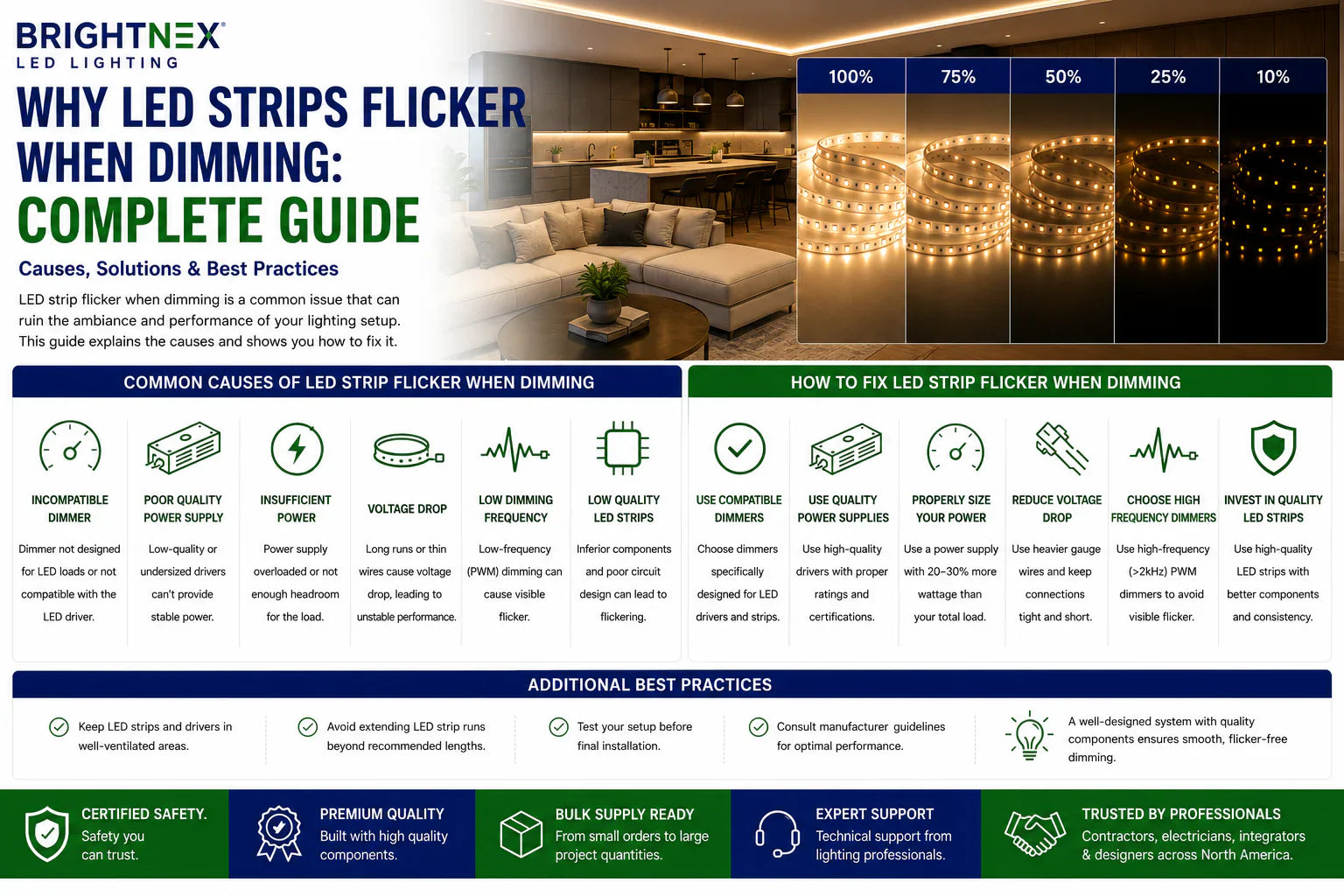
Why LED Strip Flicker Happens During Dimming
LED strip lighting often performs perfectly at full brightness but begins to flicker, pulse, or behave inconsistently when dimmed. While many people assume the strip itself is defective, the real cause is usually somewhere else in the lighting system.
For electricians, lighting dealers, contractors, and project buyers, flicker is one of the most common service complaints because it affects both performance and customer satisfaction. In luxury residential projects, where smooth dimming is expected, even minor flicker can make an otherwise premium installation feel unfinished.
Understanding the source of the problem is the first step toward preventing costly callbacks.
The Most Common Cause: Driver and Dimmer Mismatch
The majority of LED strip dimming problems are caused by compatibility issues between the driver and the dimmer.
A dimmable driver must be designed for the specific control method being used.
Common dimming methods include:
• TRIAC (Forward Phase)
• ELV (Reverse Phase)
• MLV (Magnetic Low Voltage)
• 0-10V
• PWM Controllers
A driver designed for one dimming method may not operate correctly with another.
In many cases, the lights will still turn on, which makes the system appear functional. However, once dimming begins, flicker, pulsing, or dropouts become visible.
Not All Dimmable Drivers Are the Same
One of the biggest misconceptions in LED lighting is that any dimmable driver works with any dimmer.
This is not true.
Professional buyers should verify:
• Driver dimming protocol
• Dimmer compatibility
• Load requirements
• Voltage requirements
A driver labeled "dimmable" simply means it supports dimming. It does not guarantee compatibility with every control method.
Load Size Can Cause Flicker
Many dimmers and drivers perform poorly when the connected load is too small.
This is especially common with:
• Short LED strip runs
• Small vanity installations
• Toe-kick lighting
• Accent lighting
When the connected wattage falls below the operating range of the dimmer, the system may experience:
• Flickering
• Delayed startup
• Visible stepping
• Inconsistent dimming
In these situations, the strip itself is usually not the problem.
Why Low-End Dimming Exposes Problems
Most LED systems operate normally at full brightness.
Flicker typically appears between approximately 5% and 30% output because the driver and dimmer must work harder to maintain stable control at lower power levels.
Common symptoms include:
• Pulsing light output
• Sudden shutoff near the bottom of the dimming range
• Flashing during transitions
• Uneven dimming behavior
This often indicates a compatibility limitation rather than a defective product.
The Driver Should Be Your First Checkpoint
When troubleshooting dimming issues, start with the driver.
Verify:
• Driver voltage matches the strip
• Driver wattage is sufficient
• Dimming method is compatible
• Driver is properly rated for the application
Premium drivers generally provide more stable dimming performance, especially in architectural and luxury residential projects where smooth low-level dimming is critical.
Sometimes the Dimmer Is the Problem
Even when the driver is correct, the wall dimmer may still be causing the issue.
Common causes include:
• Older incandescent dimmers
• Non-LED-rated dimmers
• Incompatible dimmer models
• Low-load instability
Many remodel projects attempt to reuse existing dimmers, which can create problems when paired with modern LED drivers.
Replacing the dimmer is often the simplest solution.
Voltage Drop Can Look Like Flicker
Long strip runs can create voltage drop issues that resemble dimming problems.
Symptoms may include:
• Uneven brightness
• Flickering near the end of runs
• Sections dimming differently
• Inconsistent color output
Common causes include:
• Excessive run lengths
• Undersized wire
• Single-end power feeds
• Insufficient power injection
Proper power planning is essential for maintaining stable output across the entire installation.
Installation Issues Can Also Cause Flicker
Even properly specified systems can develop dimming problems due to installation errors.
Areas to inspect include:
• Low-voltage connections
• Wire terminations
• Connectors
• Power supply wiring
• Grounding
Loose or poor-quality connections often create intermittent issues that become more noticeable at lower dimming levels.
RGB, RGBW, and Tunable White Systems Require Extra Attention
Color-changing systems introduce additional complexity.
Products such as:
• RGB strips
• RGBW strips
• CCT tunable white strips
• IC RGB addressable strips
often use dedicated controllers in addition to drivers.
In these systems, flicker may originate from:
• Controller configuration
• Signal wiring
• Channel loading
• Power distribution
The entire control chain should be evaluated during troubleshooting.
How to Isolate the Problem Quickly
Professional installers often troubleshoot dimming issues by testing one component at a time.
A practical process includes:
- Verify strip voltage.
- Verify driver compatibility.
- Verify dimmer compatibility.
- Check wiring and connectors.
- Test with a known compatible dimmer.
- Test with a known compatible driver.
- Measure voltage under load.
This approach helps identify the true source of the issue without replacing unnecessary components.
How to Prevent Flicker Before Installation
The best solution is preventing flicker during system design.
Professional buyers should:
• Match driver voltage to strip voltage
• Select compatible dimming methods
• Leave wattage headroom
• Use UL-certified components
• Plan wire sizing properly
• Minimize voltage drop
• Verify compatibility before ordering
A properly designed system typically delivers smooth dimming without requiring field modifications later.
Why System-Based Purchasing Matters
Many dimming problems occur because strips, drivers, and controls are sourced separately without confirming compatibility.
Professional buyers often reduce risk by selecting:
• Compatible LED strips
• Matching dimmable drivers
• Approved dimmers
• Proper accessories
Evaluating the lighting system as a complete package helps improve reliability while reducing troubleshooting time.
Conclusion
If you are wondering why LED strips flicker when dimming, the answer is usually not the strip itself. Most flicker issues originate from mismatched drivers, incompatible dimmers, improper load conditions, voltage drop, or installation-related problems.
By selecting compatible components, verifying dimming methods, and treating the lighting system as a complete package, contractors and installers can achieve smooth, reliable dimming while avoiding costly callbacks and customer complaints.
FAQ
Why do LED strips flicker when dimmed?
The most common cause is incompatibility between the driver and the dimmer.
Can a bad driver cause flickering?
Yes. Driver quality and compatibility are among the leading causes of LED dimming problems.
Do all dimmable drivers work with every dimmer?
No. Drivers must be matched to the specific dimming protocol being used.
Can voltage drop cause flickering?
Yes. Long runs and undersized wiring can create instability that appears as flicker.
How can I prevent LED strip flicker?
Use compatible drivers and dimmers, allow proper wattage headroom, and verify system compatibility before installation.